WeatherNews: Local & Breaking
NEWSDELIVER LIMITEDNews & Magazines
4.472.00 Reviews
- Version
- 1.6.0
- Installs
- 500.00K
- Age Rating
- Everyone
Screenshots
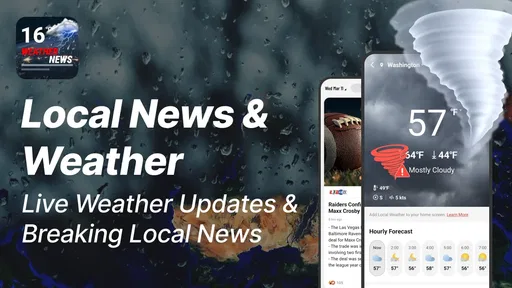
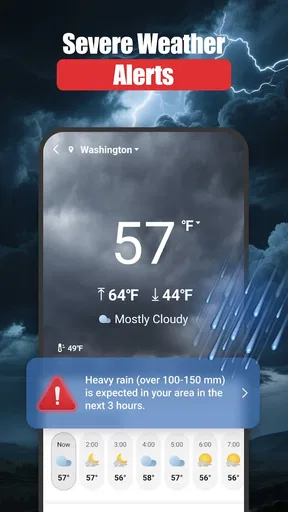
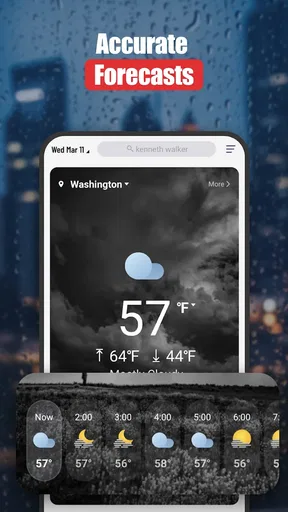
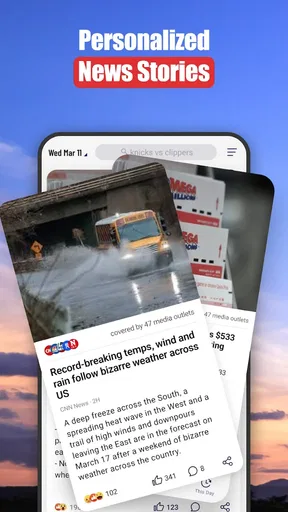
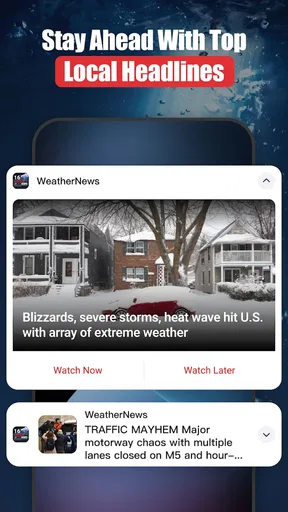
Our Review of WeatherNews: Local & Breaking
 Analysis by Appyee
WeatherNews: Local & Breaking is the kind of app I would keep on my phone when I want weather information and nearby news in one place, rather than jumping between a forecast service and a separate news reader. Its central idea is simple, but useful: combine live weather, daily and hourly forecasts, and local and world news in a single app. After spending time with it, my view is that it works best as a quick daily briefing, not as a complete replacement for a dedicated weather station or a full-featured newspaper app.
That distinction matters. The app is made by NEWSDELIVER LIMITED and sits in the News & Magazines category, although its weather tools are clearly a major part of the experience. The current release is version 1.6.0, and it is free to install for users on Android 8.0 or later. I found the combination appealing because weather often determines what I need to know from the news: travel conditions, local disruption, outdoor plans, or simply whether I should leave home earlier.
The app has reached more than 500 thousand installs and holds a 4.4 average from around 1.4 thousand ratings, which suggests that its straightforward approach has found an audience. It is rated for Everyone, so the presentation is accessible rather than aimed at a specialist audience. Still, the real question is not whether the concept sounds convenient. It is whether the combination remains clear and useful when I need information quickly.
How the combined weather and news experience works
The strongest part of the app is its ability to put two kinds of information beside each other without making the purpose difficult to understand. I can check the current weather, look ahead through the day, and then move into news coverage without opening another service. That makes the app especially practical during the first few minutes of the morning, when I am deciding what to wear, how to travel, and whether anything important happened overnight.
The daily forecast is more useful for planning than a single current-condition screen. I tend to use it when organizing errands, deciding when to walk, or checking whether an outdoor appointment is realistic. The hourly view is better for short-term choices. For example, if I have a school pickup or a commute later in the day, an hourly forecast gives me a more practical window for leaving than a general daily symbol.
The local and world news side adds context that a weather-only app cannot provide. A forecast may tell me to expect difficult conditions, but a local story may explain a road closure, event change, or disruption that affects my plans. I would not treat the app as a substitute for checking an official emergency source when conditions are serious, but the pairing makes it easier to notice that weather and local events may be connected.
The most valuable feature is the change in context between forecast and headlines. I can start with a practical question—“What will today be like?”—and then see whether the wider day includes news worth knowing. That is a better fit for people who prefer a compact briefing to a long, customizable information dashboard.
A realistic morning routine
Imagine a weekday morning with a short commute and a busy schedule. I open the app before breakfast and check the hourly forecast rather than relying only on the day’s overall outlook. If rain appears around the time I need to leave, I can adjust my departure or choose another way to travel. I then scan local headlines for anything that could affect the route or the day’s plans, followed by a quick look at world news.
This workflow sounds ordinary, but it is where the app earns its place. I do not need to assemble the information myself, and I am less likely to forget the news portion after checking the weather. The app is not trying to turn that routine into an elaborate research session. Its strength is reducing small amounts of friction several times a day.
I also found the hourly forecast more useful when I treated it as a planning guide rather than a promise. Weather changes, and a precise-looking time slot should not encourage overconfidence. For important travel, I would still check a local authority or transport service. The app helps me decide what to investigate next; it should not be the only source for high-consequence decisions.
Where the app feels more convenient than separate alternatives
A dedicated weather app will often offer a deeper forecast presentation, while a dedicated news app may provide more control over topics, publications, and reading history. WeatherNews: Local & Breaking is not obviously aimed at beating those specialists at every individual task. Instead, it wins through consolidation.
For casual users, that can be a genuine advantage. One focused app is easier to remember, easier to open, and less likely to create a cluttered home screen. I would particularly recommend this arrangement to someone who wants weather available at a glance but also wants a simple news habit. It avoids the feeling that checking the forecast and checking the news are two unrelated chores.
The trade-off is depth. Readers who want a carefully curated news feed with extensive topic controls may find a dedicated news reader more satisfying. Likewise, weather enthusiasts who compare multiple forecast models, track detailed atmospheric information, or want highly specialized alerts may prefer a purpose-built weather tool. This app is strongest in the middle: more informative than a basic weather widget, but less specialized than an expert platform.
Small habits that make it more useful
I would begin by checking the daily view first and then switching to hourly information only when I have a specific plan. That keeps the forecast from becoming a stream of numbers without a decision attached to it. The daily screen answers whether the day looks broadly manageable; the hourly screen helps with timing.
Another useful habit is to read local coverage before world news when I am preparing to leave home. Local information is more likely to affect my immediate route or schedule, while world headlines are better suited to a quieter second pass. This order makes the app feel less like an endless feed and more like a practical briefing.
I also recommend treating the news section as a starting point. If a headline affects health, travel, severe weather, or public safety, I would open the relevant official source separately before acting. The app is convenient for discovery, but convenience should not be confused with authority in situations where details change quickly.
What I liked, and where the experience falls short
The interface concept is easy to understand. Weather and news are both information-heavy subjects, yet the app’s purpose is not difficult to explain to another person: check the conditions, then catch up on important stories. That clarity is a strength for people who dislike complicated dashboards.
I also like the balance between immediate and broader information. The current weather and hourly forecast answer urgent everyday questions, while daily planning and news provide a wider view. The app feels more useful than a single-purpose forecast when I want a short session that covers the basics of the day.
The free entry point is another positive. I can try the main experience without paying upfront, which makes it easier to decide whether the combined format suits my habits. There are in-app purchases ranging from $1.99 to $39.99 per item, so anyone who prefers a completely cost-free experience should pay attention to any optional purchase prompts and decide carefully before buying.
The main weakness is that combining two categories can also make each one feel less complete. A user who wants weather to be the entire focus may find the news material distracting. A user who opens the app mainly for headlines may want a richer reading environment than a forecast-centered product provides. The same compactness that makes the app convenient can make it feel limited when I want to go deeper.
There is also a mental cost to switching between forecast information and news. Even when the sections are logically related, they require different kinds of attention. Weather is usually scanned for a decision, while news is read for context. If I am in a hurry, I may only glance at both. That is useful for awareness, but not enough for serious reading.
Another limitation is the danger of false precision. Hourly forecasts encourage exact planning, but weather is not perfectly predictable. I would use the information to choose between sensible options, not to schedule every minute outdoors. For important events, I would check the forecast again closer to the time and confirm any local warnings elsewhere.
Privacy-conscious users may also want to think about how comfortable they are with a location-oriented weather experience before making it part of their routine. I cannot recommend assuming that every weather app handles location in the same way. My practical advice is to review the device permission choices during setup and allow only what fits your use. If you do not want location-based weather, you should be prepared to select or enter a place manually if the app supports that workflow on your device.
Who should use it every day?
This app is a good match for people who want a simple daily information habit. It suits commuters, parents planning school runs, casual travelers, and anyone who checks the forecast before deciding how to spend the day. It is also useful for readers who feel that separate weather and news apps create unnecessary friction.
I can see it working particularly well for someone who does not want to customize every part of a news feed. The app’s appeal is not endless adjustment; it is having useful information ready for a quick check. If your ideal morning routine takes a few minutes and includes both conditions and headlines, the combined format makes sense.
It may also help older or less technical users who prefer fewer apps to learn. A broad Everyone age rating reflects the approachable nature of the product, and the basic purpose is easy to communicate. I would still show a new user where the forecast changes from daily to hourly and explain that news headlines are best used as a route into fuller coverage when a story matters.
On the other hand, I would skip it if weather is a serious hobby or profession for you. People who need detailed meteorological layers, advanced comparisons, specialized alerts, or extensive historical analysis will probably be happier with a dedicated weather service. I would also choose a specialist news reader if my main goal were long-form journalism, carefully managed subscriptions, or deep control over sources.
The app is less suitable for anyone who wants a completely passive experience with no need to distinguish between a quick headline and confirmed information. Its convenience is valuable, but I still need to judge which stories deserve a closer look. That is true of news apps generally, but the compact format can make it especially tempting to stop at the first headline.
Device support, cost, and everyday expectations
Android users on version 8.0 or newer can use the app, which covers a wide range of devices. I would expect the experience to be most comfortable on a phone where scrolling between forecast details and headlines feels natural. On a smaller or older device, the amount of information on screen may make quick scanning less comfortable, although the basic concept remains easy to follow.
The app is free to download, with optional purchases available inside it. I appreciate being able to test the central idea before committing money, but I would not assume that every useful convenience is included at no cost. Before confirming a purchase, I would look at exactly what it unlocks and whether it changes something I genuinely use every day.
Because this is a current release rather than an old, abandoned utility, I would keep an eye on updates and changes to the balance between weather and news. Version 1.6.0 is the release I reviewed, and future revisions could alter navigation or the way information is presented. That is not a reason to avoid it; it is simply a reminder to recheck settings after major updates, especially if the app becomes part of a daily routine.
My final recommendation
My overall opinion is positive, with a clear qualification: WeatherNews: Local & Breaking is best understood as a convenient daily briefing rather than the ultimate tool for either weather or journalism. It succeeds because it joins two habits that naturally belong together. I can check what the day may feel like, then see whether local or world events give me another reason to adjust my plans.
The strongest case for installing it is convenience. The strongest case against it is specialization. A dedicated weather app will usually be the better choice for detailed forecast analysis, and a dedicated news app will usually be better for serious reading. But if I want a free, approachable way to cover both basics in one place, this app makes a convincing case.
I would recommend trying it to anyone who wants a short morning check without managing several separate apps. I would not recommend relying on it alone for emergency decisions, highly technical weather needs, or deep news research. Used with those boundaries in mind, it is a practical addition to an Android news-and-weather routine, and its 4.4 average from around 1.4 thousand ratings reflects why the straightforward approach appeals to many users.
My verdict: choose it for a compact daily overview, not for specialist depth. That is a modest promise, but the app largely keeps it. For me, the combination is worthwhile when I want to understand both the conditions outside and the stories shaping the day before moving on with it.
Verdict
Strengths of WeatherNews: Local & Breaking
- Detailed local forecasts with useful hourly and daily views.
- Breaking weather alerts help users prepare for sudden conditions.
- Radar and map tools make it easy to track approaching storms.
- Community reports can add helpful, real-time local observations.
- Supports weather updates for multiple saved locations.
Limitations of WeatherNews: Local & Breaking
- Some advanced features may require a paid subscription.
- Frequent notifications can feel excessive without careful settings.
- Forecast accuracy may vary in areas with limited local coverage.
- The interface can feel busy because of ads and numerous data panels.
- Some content and features may depend on location or region.
Other Releases by NEWSDELIVER LIMITED
View All
Local News: Breaking & Latest
News & Magazines4.4
Similar Picks in This Category
View All
Google News - Daily Headlines
Google LLC4.0

X
X Corp.4.8

Flipboard:Your Social Magazine
Flipboard3.4

Opera News: breaking & local
Opera4.5

Hindi News by Dainik Bhaskar
Dainik Bhaskar Group4.0

Way2News Daily News App
Way2News ( Formerly Way2SMS )4.6
Frequently Asked Questions
What is WeatherNews: Local & Breaking used for?
WeatherNews: Local & Breaking is designed to provide weather information for your current location and other places you choose to follow. It typically combines forecasts, current conditions, radar or map views, severe-weather notifications, and breaking local updates in one app. It can be useful for checking daily plans, commuting conditions, travel arrangements, and potentially dangerous weather before leaving home.
Does WeatherNews: Local & Breaking provide accurate local forecasts?
The app is intended to deliver location-based forecasts using available meteorological data, but accuracy can vary depending on your region, forecast provider, and how quickly conditions change. Short-term predictions are generally more dependable than forecasts several days ahead. For hurricanes, tornadoes, floods, or other serious emergencies, users should also consult official government weather services and local authorities rather than relying on one application alone.
Does the app send severe-weather or breaking-news alerts?
WeatherNews: Local & Breaking may offer notifications for severe conditions, important weather changes, and local breaking updates, depending on your location and the permissions enabled on your device. After installation, review the notification settings carefully so you can choose which alerts you want to receive. Keep in mind that alerts may depend on regional coverage, internet access, background permissions, and the availability of timely local data.
Does WeatherNews: Local & Breaking require location access?
Location access is useful because it allows the application to automatically show weather conditions and alerts for where you are. You can usually choose between approximate or precise location access, and some versions may let you enter locations manually instead. If privacy is a concern, review the permission request before accepting it, disable background location when it is unnecessary, and check the app’s privacy policy for details about data collection and sharing.
Is WeatherNews: Local & Breaking free to download and use?
The application may be available as a free download, although certain features, advertising controls, premium content, or subscription options can vary by platform and region. Before completing an installation, check the Google Play or App Store listing for in-app purchases and subscription terms. If you enable a trial or recurring plan, confirm the renewal price and cancellation procedure so you are not charged unexpectedly.
